
Setting up a Web Server with Nginx
Our Node app is running on the Docker container we created in the last post.
Let's add an Nginx Web Server to our Droplet, so that we can reverse-proxy all traffic to our server.
Install Nginx
We can connect to our Droplet and install Nginx with the following command:
$ apt install nginx
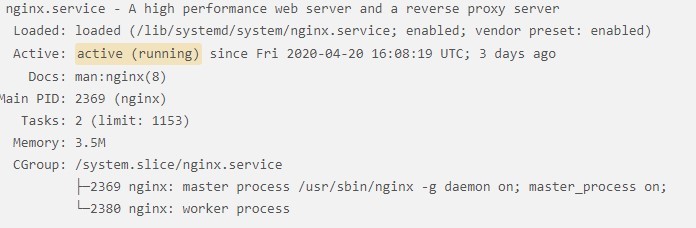
When the installation is completed, verify that Nginx is running by typing:
$ systemctl status nginx
And we should get something similar to:
Server Blocks
We can set up server blocks to set different configurations and host more than one domain from a single server.
For this, we can create new config files (i.e., /etc/nginx/sites-available/your_domain) for our domain or we can use the default file (/etc/nginx/sites-available/default).
We will just modify the default file. So modify it as follows:
server {server_name your_domain www.your_domain;location / {proxy_pass http://your_domain:port;}}
NOTE: If you are creating your own files for your domain, make sure you link them to the /etc/nginx/site-enabled directory with the following command:
$ ln -s /etc/nginx/sites-available/your_domain /etc/nginx/sites-enabled/
Test to make sure there's no syntax error in the files by typing:
$ nginx -t
If everything is good, restart Nginx:
$ systemctl restart nginx
That's it! Nginx is now running on our Droplet, and it will direct traffic to our domain, where our Node app is running.
Conclusion
We set up Nginx Web Server on our Droplet. In the next post, we will set up SSL with Let's Encrypt.